Cluster Computing Management Module QLUSTER
WARNING!
In QHB 1.5.3 release, this feature is experimental and is not recommended for use in a production installation.
Purpose and General Architecture
QLUSTER is a software module designed for managing distributed tasks in a cluster. QLUSTER is based on the QRaft state consistency protocol, which ensures the consistency and fault tolerance of cluster operations.
QLUSTER provides:
- Task and state lifecycle management using QRaft.
- Interaction with external systems via APIs.
- Scheduling and routing of computing tasks across cluster nodes.
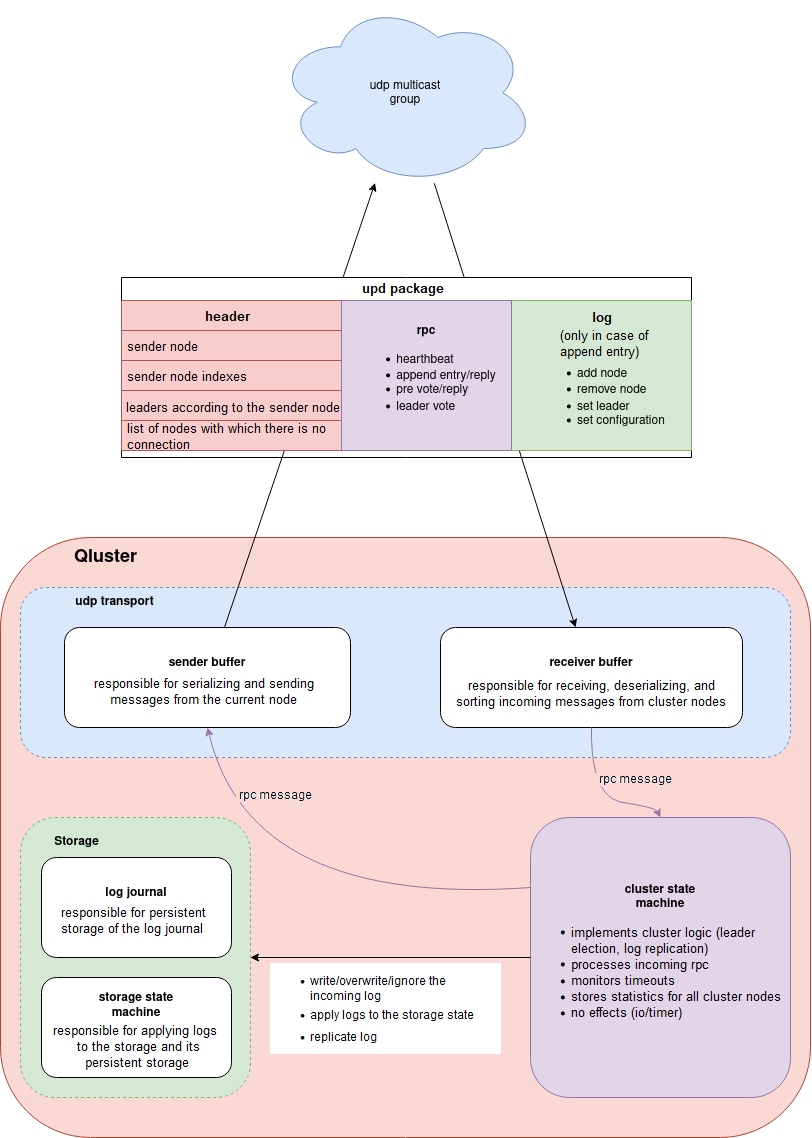
Components:
Figure 1. Cluster components
QLUSTER Installation
To install QLUSTER, you need to download the binary file, configure the launcher service, and create a config.yaml configuration file, which defines the node behavior in a cluster environment.
Installing the Binary File
- Copy the QLUSTER binary file to the server intended to run as part of the cluster.
- Ensure that user qhb has access to the binary file.
Creating the Service systemd
Create a system service based on the binary file to manage the launch of QLUSTER as a daemon. The service must run under qhb.
An example (/etc/systemd/system/qluster.service):
[Unit]
Description=QLUSTER service
After=network.target

[Service]
User=qhb
ExecStart=/usr/local/bin/qluster --config /etc/qluster/config.yaml
Restart=always

[Install]
WantedBy=multi-user.target
Activate the service:
sudo systemctl daemon-reexec
sudo systemctl enable qluster
sudo systemctl start qluster
Setting Up the Configuration File
The QLUSTER node configuration is set via the config.yaml file, which should be located next to the binary file or at the specified path. Example contents:
ip: "server ip address"
api-port: 8080

udp:
  socket:
    group: "udp multicast address:port must be the same on all nodes"
    interface: "network interface name for udp multicast"
    pacing-rate: 268435456
    loopback: false
    send-buffer-size: 1048576
    recv-buffer-size: 1048576
  max-log-size: 64000
  send-buffer-capacity: 256
  recv-buffer-capacity: 256

cluster:
  node-timeout: 30s
  heartbeat-interval: 10s
  pre-voting-timeout: 10s
  leader-voting-timeout: 10s
  quorum-replication: true
  replication-factor: 0
  replication-retry-interval: 1s
  autoremove-enabled: false
  autoremove-minimum: 3
  remove-interval: 1m

hello-retry-interval: 1s
Note
Parameter values must be synchronized across all cluster nodes, especially the udp.socket.group, interface, and pacing-rate fields.
Key parameters:
- node-timeout — the maximum waiting time for a response from the current leader before the start of the pre-voting.
- pre-voting-timeout — the duration of the pre-vote stage, during which nodes evaluate the possibility of initiating a voting.
- leader-voting-timeout — the maximum time allotted for performing a leader voting (vote round).
- heartbeat-interval — the interval between heartbeat signals sent by the leader to confirm activity.
- replication-factor — the number of replicas (nodes) to which a log entry must be delivered before it is committed (the default is 0, i. e. the quorum value is used).
- quorum-replication — enabling quorum-based replication: an entry is considered confirmed if it has been delivered to at least n/2 + 1 nodes.
- replication-retry-interval — the interval at which another log replication attempt is performed in the event of a failure
- autoremove-enabled — automatic removal of nodes from the cluster if they are unavailable to the majority (quorum).
- autoremove-minimum — the minimum number of nodes in a cluster at which the auto-removing mechanism is allowed to be triggered.
Reinitializing a Cluster Under QLUSTER Control
Sometimes you need to completely reinitialize the cluster. To do this, follow these steps:
- Stop services (qluster, qcp):
systemctl stop qluster
systemctl stop qcp
- Clear database directories using the command:
rm -rf /opt/qhb-data/*
- On the master node, delete the file /qluster/add_node:
rm /qluster/add_node
- Delete the contents of the network directory for the WAL archive:
rm /opt/qhb-backup/wal/*
You can combine these actions into two commands for the main node and for the other nodes:
systemctl stop qluster && rm /opt/qhb-backup/wal/* && rm /qluster/add_node && rm -rf /opt/qhb-data/* # for the main leader node
systemctl stop qluster && rm -rf /opt/qhb-data/* # for qhb replica nodes
Next, you need to sequentially, with short pauses, start the qluster service on all three nodes with QHB, starting with the leader node where the file /qluster/add_node was deleted:
systemctl start qluster
The database directory will be automatically initialized on the leader node, and replicas will be automatically created on the replica nodes. Temporary replication slots are used, which are created automatically when needed.
If QCP is used during testing, you must start the qcp service on the fourth host:
systemctl start qcp
List of Commands
- Starting the QLUSTER service:
systemctl start qluster
- Stopping the QLUSTER service:
systemctl stop qluster
- Restarting the QLUSTER service:
systemctl restart qluster
- Checking service status:
systemctl status qluster
- Reading QLUSTER logs:
journalctl -u qluster --since "2025-08-12 15:12:00"
Some data can also be retrieved via Swagger or directly via the REST interface.
Important Features
If QHB stops while qcp is running, it begins intensively attempting to establish a connection with the non-running QHB, and soon the system log grows dramatically in size, filling up all available space. After eliminating the causes of the log generation (starting QHB or stopping qcp), clear the system log as the root user using the following command:
truncate -s 0 /var/log/syslog # Clearing the system log in Ubuntu